Antenna models
This section provides some example models of antennas. Each example comes with an input file which you can download and run.
Wire dipole antenna model
antenna_wire_dipole_fs.in
and
antenna_wire_dipole_fs.py
are equivalent hash-command and Python API models of a half-wavelength wire
dipole in free space. The balanced antenna is 150 mm long and has a one-cell,
1 mm gap between its PEC arms.
 1#title: Half-wavelength wire dipole with a voltage-source port
 2#domain: 0.050 0.050 0.200
 3#dx_dy_dz: 0.001 0.001 0.001
 4#time_window: 60e-9
 5
 6#waveform: gaussian 1 1e9 mypulse
 7
 8## A 150 mm PEC wire with a one-cell gap at its centre.
 9#edge: 0.025 0.025 0.025 0.025 0.025 0.175 pec
10#edge: 0.025 0.025 0.100 0.025 0.025 0.101 free_space
11
12## The voltage source automatically owns port output called "feed".
13#voltage_source: z 0.025 0.025 0.100 50 mypulse 0 60e-9 feed 10
14
15#geometry_view: 0.020 0.020 0.020 0.030 0.030 0.180 0.001 0.001 0.001 antenna_wire_dipole_fs f
The antenna is excited by a one-cell, 50 Ohm resistive voltage source whose
optional ID names the automatic output port feed. gprMax samples the total
gap voltage during the solve and, after the
time loop, directly calculates the complex reflection coefficient, input
impedance, and input admittance. The effective Yee-edge gap capacitance and
background conductance are removed from the reported terminal quantities.
Users do not need to reconstruct S11 from voltage and current histories.
The Gaussian waveform has a nominal frequency of 1 GHz. The 60 ns time window provides a native FFT-bin spacing of approximately 16.7 MHz. The default voltage-source port spectrum is limited by the model’s lambda/10 mesh criterion and also carries per-frequency validity masks based on source bandwidth and the terminal reconstruction. These masks should be applied when plotting.
Results
The model HDF5 file contains the authoritative arrays directly under
/ports/feed. They can be plotted without recalculating them:
python -m gprMax.toolboxes.Plotting.plot_port \
    examples/antennas/wire_dipole/antenna_wire_dipole_fs.h5 \
    --port feed --fmin 0.5e9 --fmax 1.5e9 --tmax 10e-9 --save
The --port option may be omitted when the file contains exactly one port.
For direct access:
import h5py
import numpy as np

with h5py.File("antenna_wire_dipole_fs.h5", "r") as output:
    port = output["ports/feed"]
    frequency = port["frequency"][...]
    s11 = port["S11"][...]
    zin = port["Zin"][...]
    valid = port["valid_S11"][...].astype(bool)

s11_db = 20 * np.log10(np.abs(s11[valid]))
The saved filenames include the full port path. This prevents a second port in the same model from overwriting the first port’s figures.
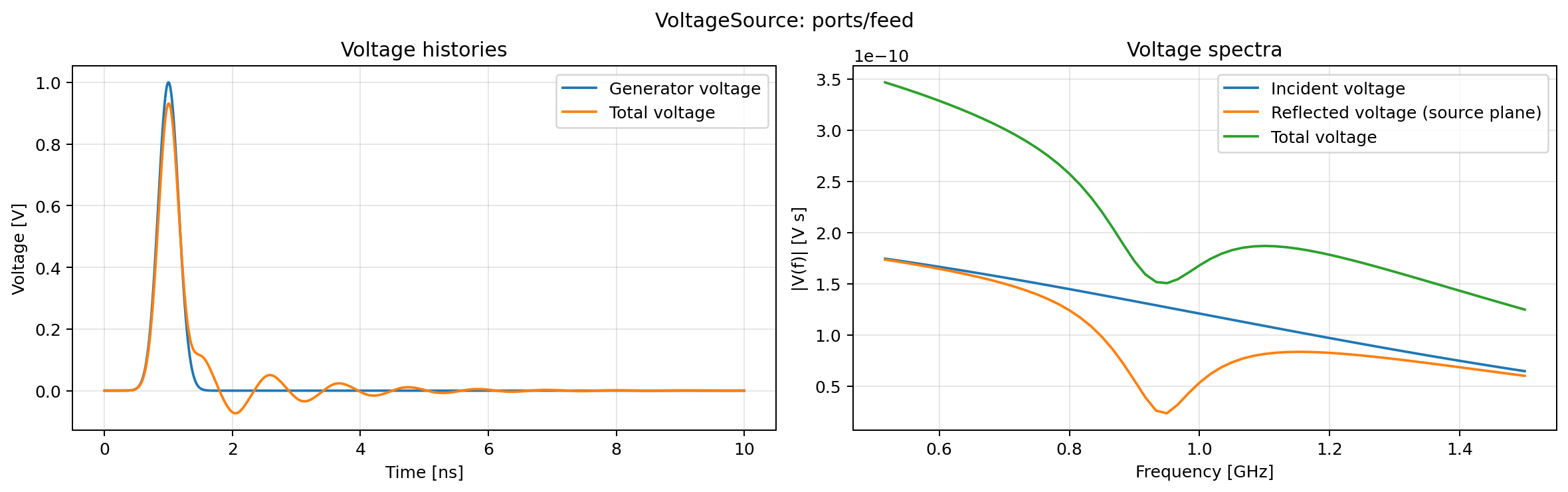
Fig. 42 Available voltage histories and spectra. No current panel is created because a resistive voltage-source port does not require or store a current history.
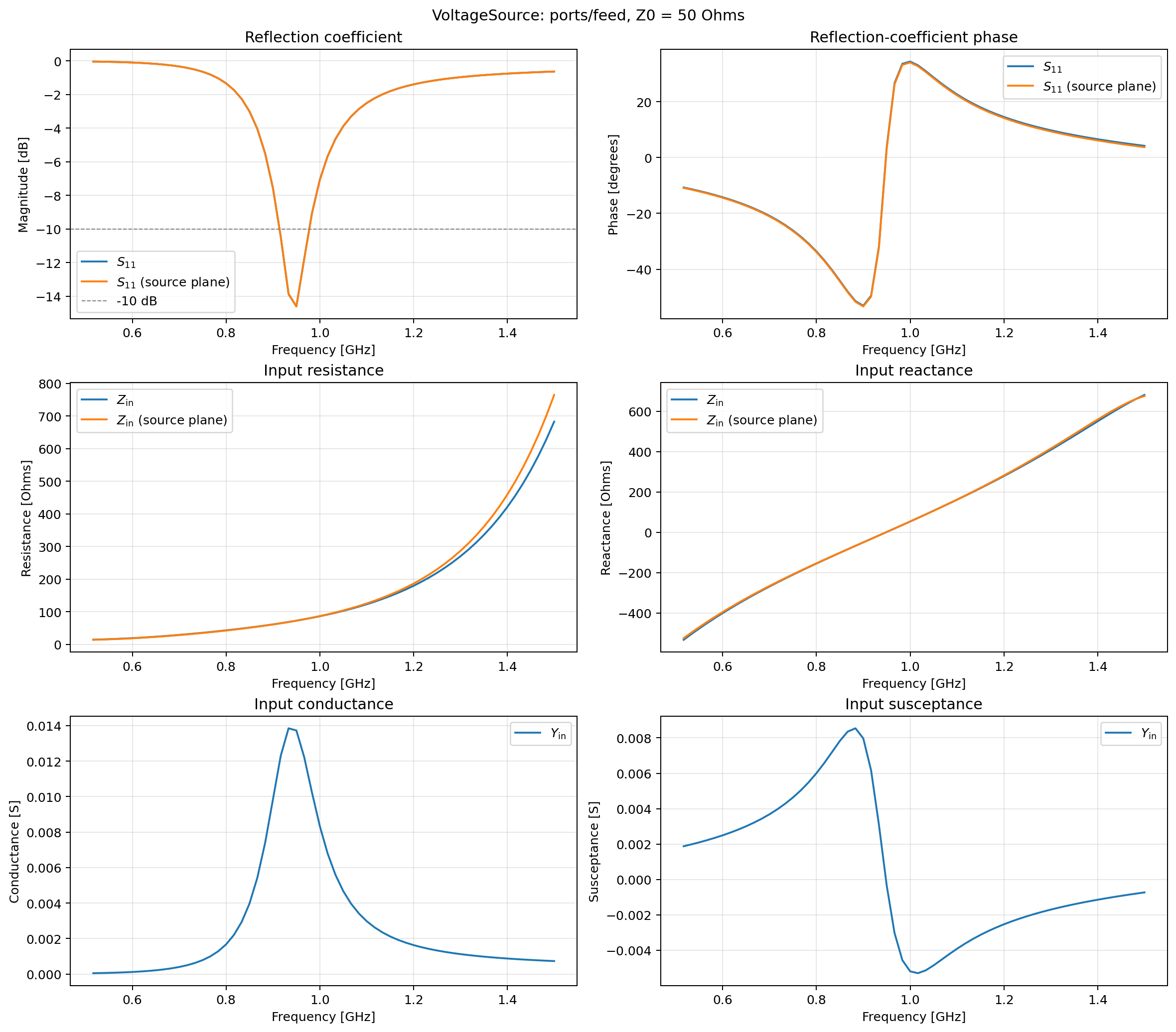
Fig. 43 Stored S11, input impedance, and input admittance for the voltage-source port.
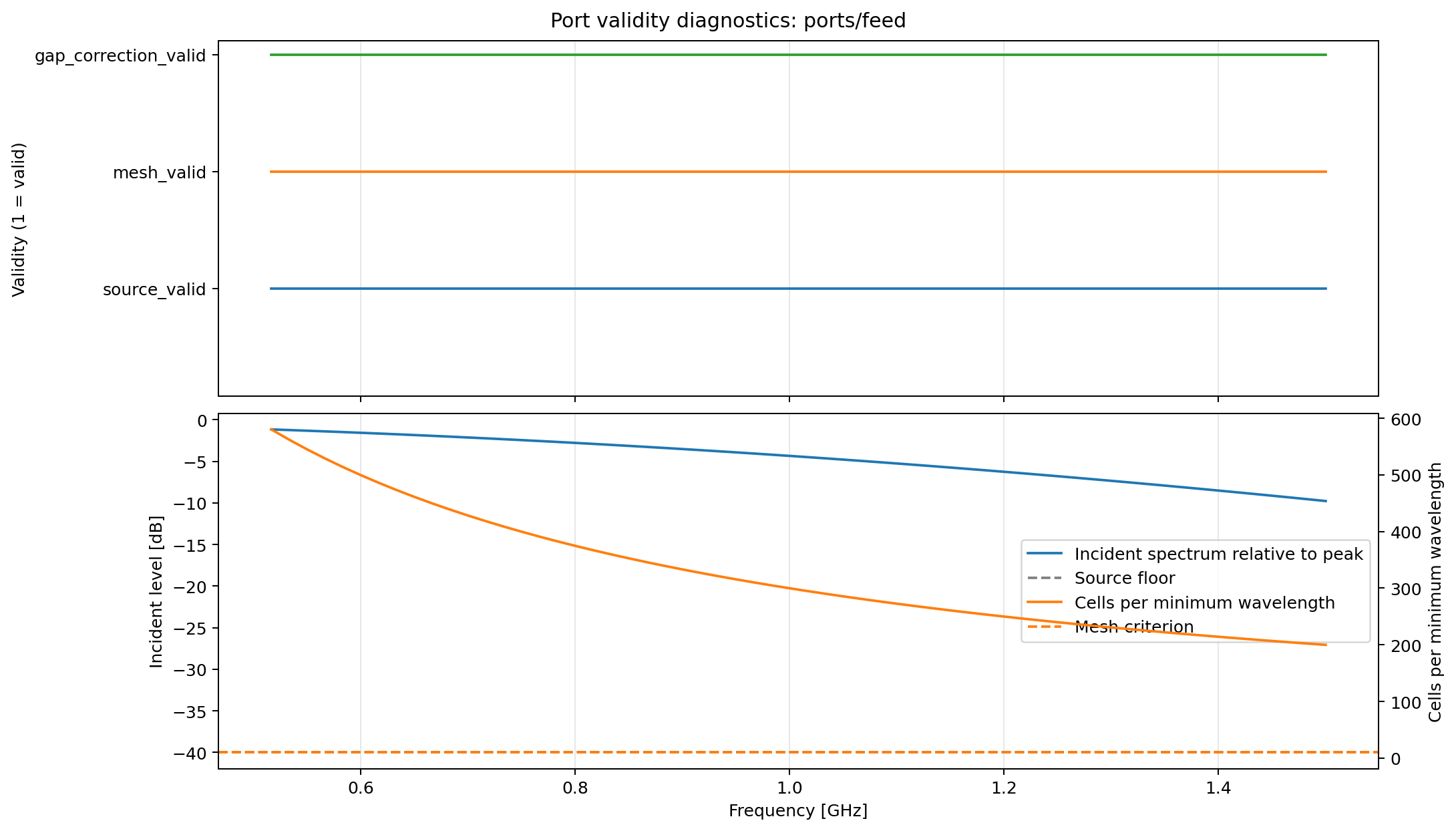
Fig. 44 Frequency-validity masks and the source-band and mesh-resolution diagnostics from which they are constructed.
For a thin centre-fed dipole, first resonance normally occurs when its length is approximately \(0.47\lambda\) to \(0.48\lambda\), depending on wire radius [BAL2005]. A half-wave dipole has a theoretical impedance near \(73+j42.5~\Omega\); shortening it to resonance removes most of that input reactance. This model gives its first resonance at approximately 950 MHz, with \(Z_\mathrm{in}\approx72.8+j1.8~\Omega\). The numerical resonance and impedance should be interpreted with a grid-convergence study because an FDTD edge has a mesh-dependent effective radius.
Radiation pattern, directivity, and gain
antenna_wire_dipole_pattern.in
extends the same one-cell voltage-port feed to a complete antenna-pattern
calculation using the traditional hash-command input. An equivalent
Python API model
is provided for users who want to generate or modify the angular requests
programmatically. The domain is enlarged to give the integration surface more
clearance from the PML. The companion
plot_wire_dipole_pattern.py
reads the persisted antenna quantities without repeating the NTFF
calculation.
 1#title: Wire dipole full-sphere gain pattern
 2#domain: 0.080 0.080 0.220
 3#dx_dy_dz: 0.001 0.001 0.001
 4#time_window: 40e-9
 5#pml_cells: 10
 6
 7#waveform: gaussian 1 1e9 dipole_pulse
 8
 9## A 150 mm z-directed PEC edge with a one-cell feed gap at its centre.
10#edge: 0.040 0.040 0.035 0.040 0.040 0.185 pec
11#edge: 0.040 0.040 0.110 0.040 0.040 0.111 free_space
12
13## The voltage source automatically owns port output called "feed".
14#voltage_source: z 0.040 0.040 0.110 50 dipole_pulse 0 40e-9 feed 10
15
16## Closed equivalent-current surface and 950 MHz full-sphere output.
17#ntff_surface: 0.018 0.018 0.020 0.062 0.062 0.200 dipole_surface
18#ntff_frequency: dipole_surface dipole_pattern 0.95e9 rectangular
19#ntff_antenna_ports: dipole_pattern feed
20#ntff_far_field_array: 0 180 5 0 355 5 dipole_pattern full_sphere Etheta Ephi radiation_intensity directivity_dbi gain_dbi realized_gain_dbi radiation_efficiency total_efficiency
21
22#geometry_view: 0.035 0.035 0.030 0.045 0.045 0.190 0.001 0.001 0.001 antenna_wire_dipole_pattern f
The NTFFSurface encloses the complete dipole and feed. The rectangular-
window NTFFFrequencyTransform accumulates conventional equivalent-current
surface phasors at 950 MHz. NTFFAntennaPorts associates the transform with
the physical feed port; this association supplies accepted and incident
power for gain, realized gain, and efficiency. Every physical port in a
multiport antenna must be listed, including ports whose source amplitude is
zero.
NTFFFarFieldArray stores a full-sphere grid with a five-degree angular
step. Directivity is normalised by total radiated power, gain additionally
includes radiation efficiency, and realized gain additionally includes port
mismatch. The definitions and HDF5 datasets are given in
NTFF field-transformation output.
Run and plot the example using:
python -m gprMax examples/antennas/wire_dipole/antenna_wire_dipole_pattern.in -gpu 0
python examples/antennas/wire_dipole/plot_wire_dipole_pattern.py
Omit -gpu 0 for a CPU simulation. The plot combines a principal-plane
cut with a 3-D realized-gain surface. Its radial coordinate is clipped to a
30 dB dynamic range while colour retains the absolute realized gain in dBi.
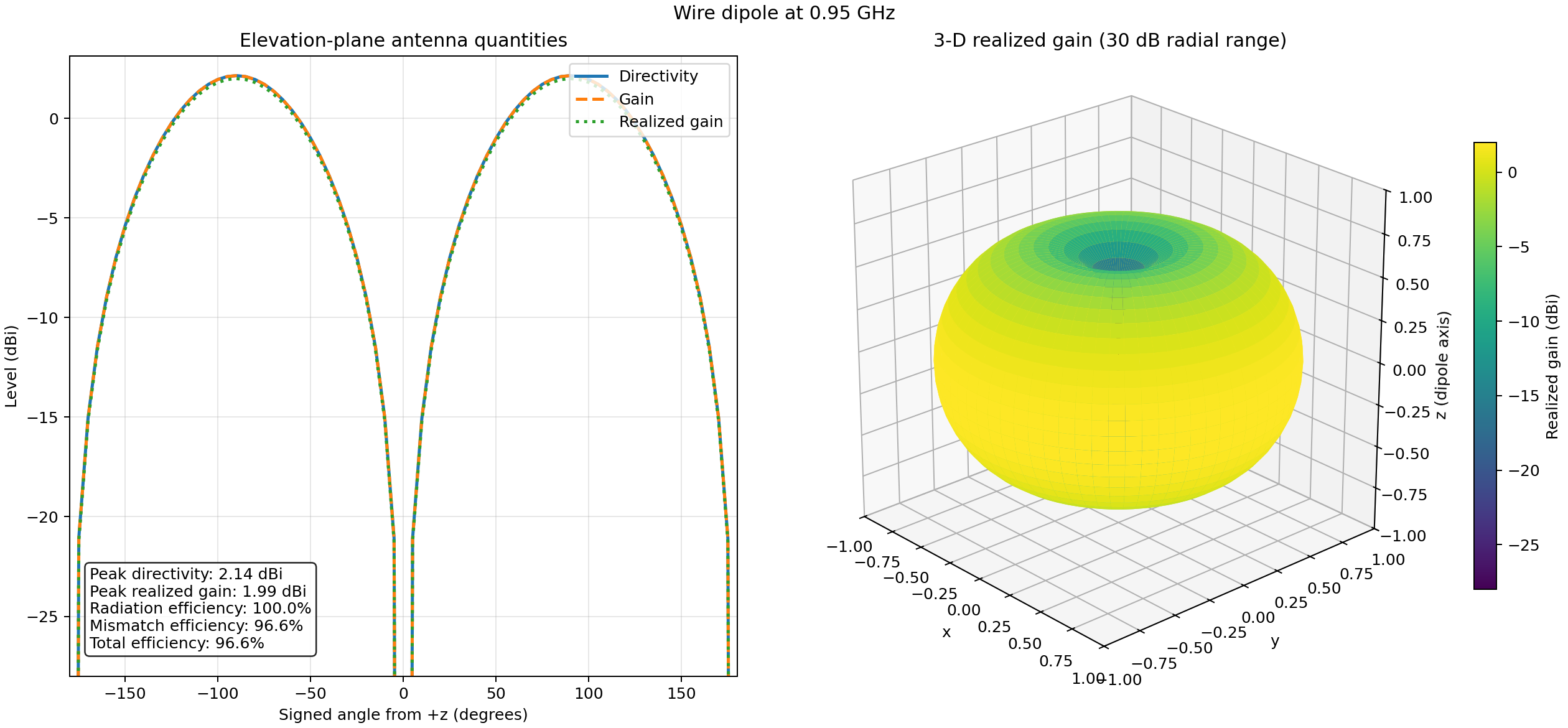
Fig. 45 Directivity, gain, and realized gain of the PEC wire dipole at 950 MHz, with the corresponding three-dimensional realized-gain pattern.
The calculated peak directivity is 2.14 dBi, close to the theoretical 2.15 dBi of a thin half-wave dipole. Because the antenna materials are lossless, the radiation efficiency is approximately 100%. The 50 Ohm feed has a 96.6% mismatch efficiency at 950 MHz, giving a peak realized gain of 1.99 dBi and a total efficiency of 96.6%. These values are frequency-specific and should be checked for mesh, domain, surface-position, and time-window convergence.
Transmission-line alternative
antenna_wire_dipole_transmission_line.py
retains the one-dimensional transmission-line feed for studies that need its
explicit incident and total voltage/current histories or the independent
current-wave terminal checks. The transmission line also stores its own
authoritative S11, Zin, and Yin datasets for direct HDF5 access.
Bowtie antenna model
This example demonstrates how to use one of the built-in antenna models in a simulation. Using a model of an antenna rather than a simple source, such as a Hertzian dipole, can improve the accuracy of the results of a simulation for many situations. It is especially important when the target is in the near-field of the antenna and there are complex interactions between the antenna and the environment. The simulation uses the model of an antenna similar to a MALA 1.2GHz antenna.
 1"""An antenna model similar to a MALA 1.2GHz antenna in free space
 2
 3This example model demonstrates how to use one of the built-in antenna models.
 4
 5The geometry is 3D and the domain filled with freespace (the default). The
 6antenna model method is imported from its toolbox and the objects that build the
 7antenna are iteratively added to the scene.
 8"""
 9
10from pathlib import Path
11
12import gprMax
13from gprMax.toolboxes.GPRAntennaModels.MALA import antenna_like_MALA_1200
14
15# File path for output
16fn = Path(__file__)
17
18# Discretisation
19dl = 0.001
20
21# Domain
22x = 0.264
23y = 0.189
24z = 0.220
25
26scene = gprMax.Scene()
27
28title = gprMax.Title(name=fn.with_suffix("").name)
29domain = gprMax.Domain(p1=(x, y, z))
30dxdydz = gprMax.Discretisation(p1=(dl, dl, dl))
31time_window = gprMax.TimeWindow(time=6e-9)
32
33scene.add(title)
34scene.add(domain)
35scene.add(dxdydz)
36scene.add(time_window)
37
38# Import antenna model and add to model
39ant_pos = (0.132, 0.095, 0.100)
40mala_objects = antenna_like_MALA_1200(ant_pos[0], ant_pos[1], ant_pos[2], resolution=dl)
41for obj in mala_objects:
42    scene.add(obj)
43
44# Run model
45gprMax.run(scenes=[scene], geometry_only=False, outputfile=fn, gpu=None)
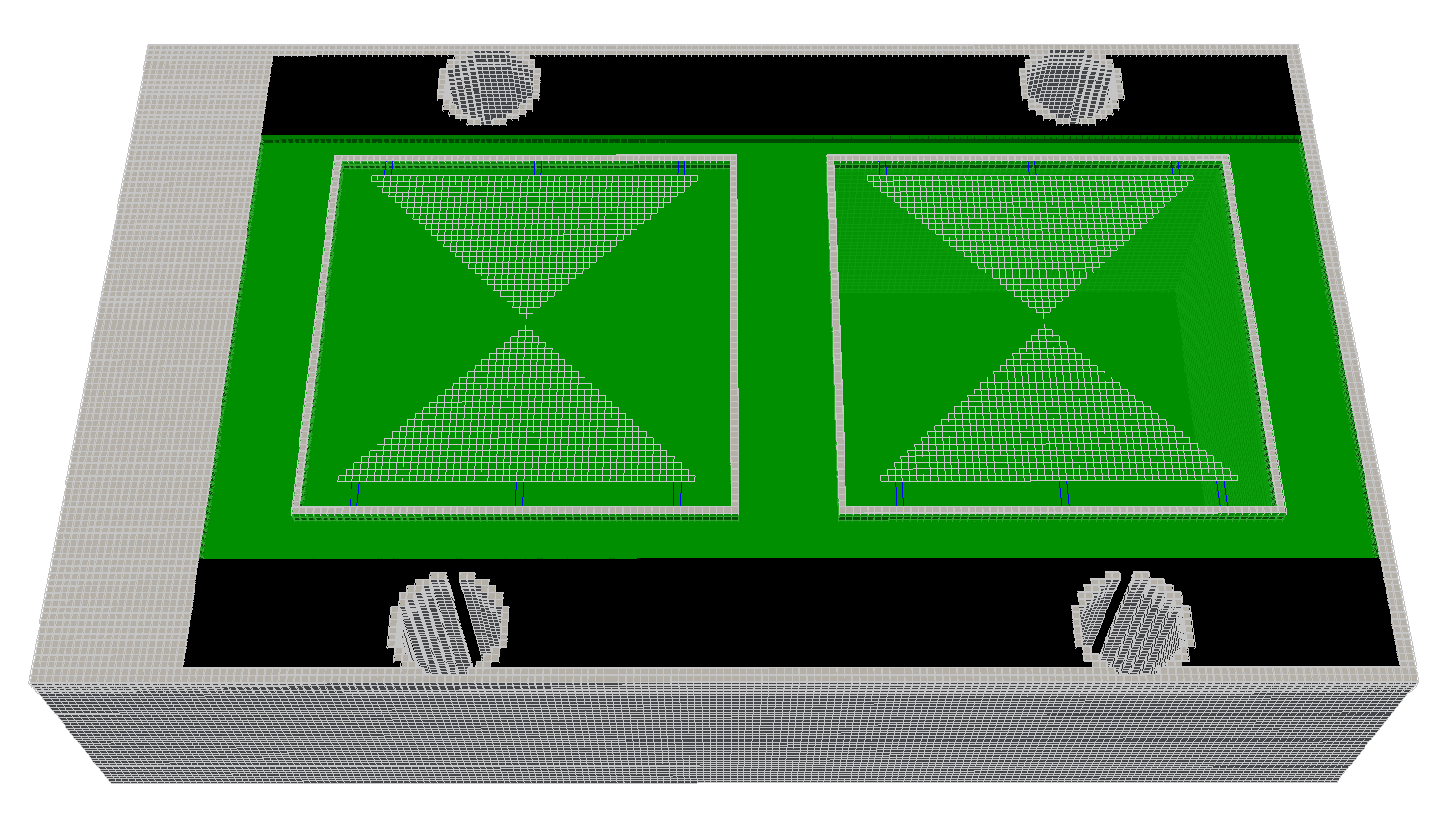
Fig. 46 FDTD geometry mesh showing an antenna model similar to a MALA 1.2GHz antenna (skid removed for illustrative purposes).
The antenna model is loaded from a Python module and the objects from the antenna model are added to the scene. The arguments for the antenna_like_MALA_1200 function specify its (x, y, z) location as 0.132m, 0.095m, 0.100m using a 1mm spatial resolution. In this example the antenna is the only object in the model, i.e. the antenna is in free space. More information on using the built-in antenna models can be found in the gprMax/toolboxes/GPRAntennaModels package.
Results
When the simulation is run two geometry files for the antenna are produced along with an output file which contains a single receiver (the antenna output). You can view the results (see Model Output section and README.rst for the gprMax/toolboxes/Plotting package) using the command:
python -m gprMax.toolboxes.Plotting.plot_Ascan examples/gpr/antennas/antenna_like_MALA_1200_fs.h5 --outputs Ey
Fig. 47 shows the time history of the y-component of the electric field from the receiver bowtie of the antenna model (the antenna bowties are aligned with the y-axis).
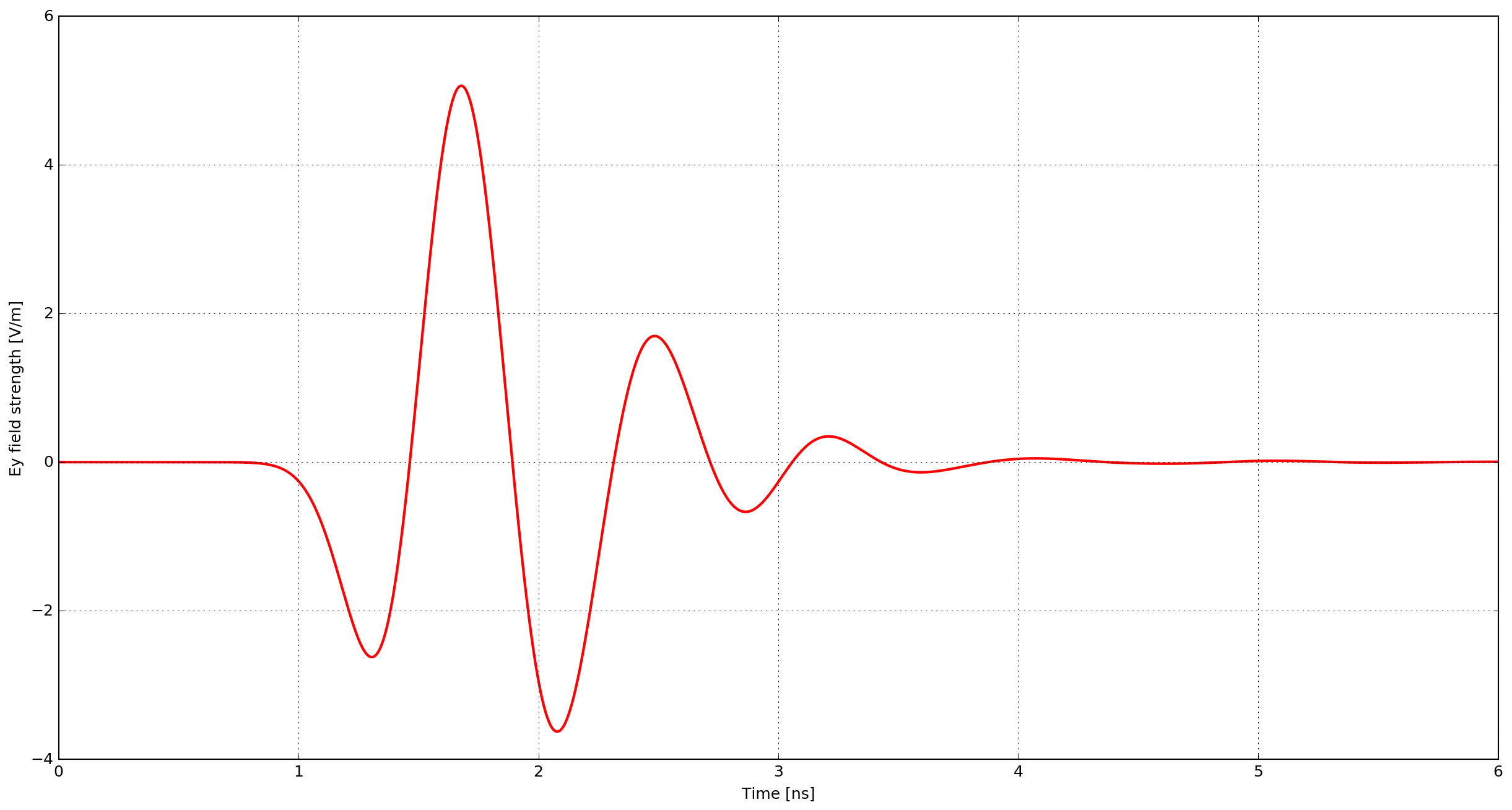
Fig. 47 Ey field output from the receiver bowtie of a model of an antenna similar to a MALA 1.2GHz antenna.
B-scan with a bowtie antenna model
This example demonstrates how to create a B-scan with an antenna model. The scenario is purposely simple to illustrate the method. A metal cylinder of diameter 20mm is buried in a dielectric half-space which has a relative permittivity of six. The simulation uses the model of an antenna similar to a GSSI 1.5GHz antenna.
 1"""B-scan using a antenna model.
 2
 3This example model demonstrates how to create a B-scan using an antenna model.
 4
 5The key part of this example is the concept of moving the antenna model in steps
 6within the model domain to create multiple A-scans that build up the B-scan.
 7Each A-scan requires its own scene and a list of scenes it built up using a for
 8loop. A different scene is required for each A-scan because the model geometry is
 9changing, as the antenna geometry must be moved to a new position. This is in
10contrast to simpler models that may use a Hertzian dipole source which has no
11associated 'geometry' and can be moved within a model without having to change
12the scene. When the all the scenes are created, the list of scenes is then passed
13to gprMax to run, noting the number of times 'n' gprMax is run corresponds to the
14number of scenes, i.e. A-scans.
15"""
16
17from pathlib import Path
18
19import gprMax
20from gprMax.toolboxes.GPRAntennaModels.GSSI import antenna_like_GSSI_1500
21
22# File path for output
23fn = Path(__file__)
24
25# Discretisation
26dl = 0.001
27
28# Domain
29x = 0.480
30y = 0.148
31z = 0.235
32
33# Create list of scenes (A-scans) that comprise B-scan:
34scenes = []
35
36for i in range(1, 55):
37    scene = gprMax.Scene()
38
39    title = gprMax.Title(name=fn.with_suffix("").name)
40    domain = gprMax.Domain(p1=(x, y, z))
41    dxdydz = gprMax.Discretisation(p1=(dl, dl, dl))
42    time_window = gprMax.TimeWindow(time=6e-9)
43
44    scene.add(title)
45    scene.add(domain)
46    scene.add(dxdydz)
47    scene.add(time_window)
48
49    mat = gprMax.Material(er=6, se=0, mr=1, sm=0, id="half_space")
50    c1 = gprMax.Cylinder(p1=(0.240, 0, 0.080), p2=(0.240, 0.148, 0.080), r=0.010, material_id="pec")
51    scene.add(mat)
52    scene.add(c1)
53
54    # Import antenna model and add to model
55    ant_pos = (0.125, 0.094, 0.100)
56    gssi_objects = antenna_like_GSSI_1500(0.105 + i * 0.005, 0.074, 0.170, resolution=dl)
57    for obj in gssi_objects:
58        scene.add(obj)
59
60    gv1 = gprMax.GeometryView(
61        p1=(0, 0, 0),
62        p2=(x, y, z),
63        dl=(dl, dl, dl),
64        filename=fn.with_suffix("").name,
65        output_type="n",
66    )
67    # scene.add(gv1)
68
69    scenes.append(scene)
70
71# Run model
72gprMax.run(scenes=scenes, n=len(scenes), geometry_only=False, outputfile=fn, gpu=None)
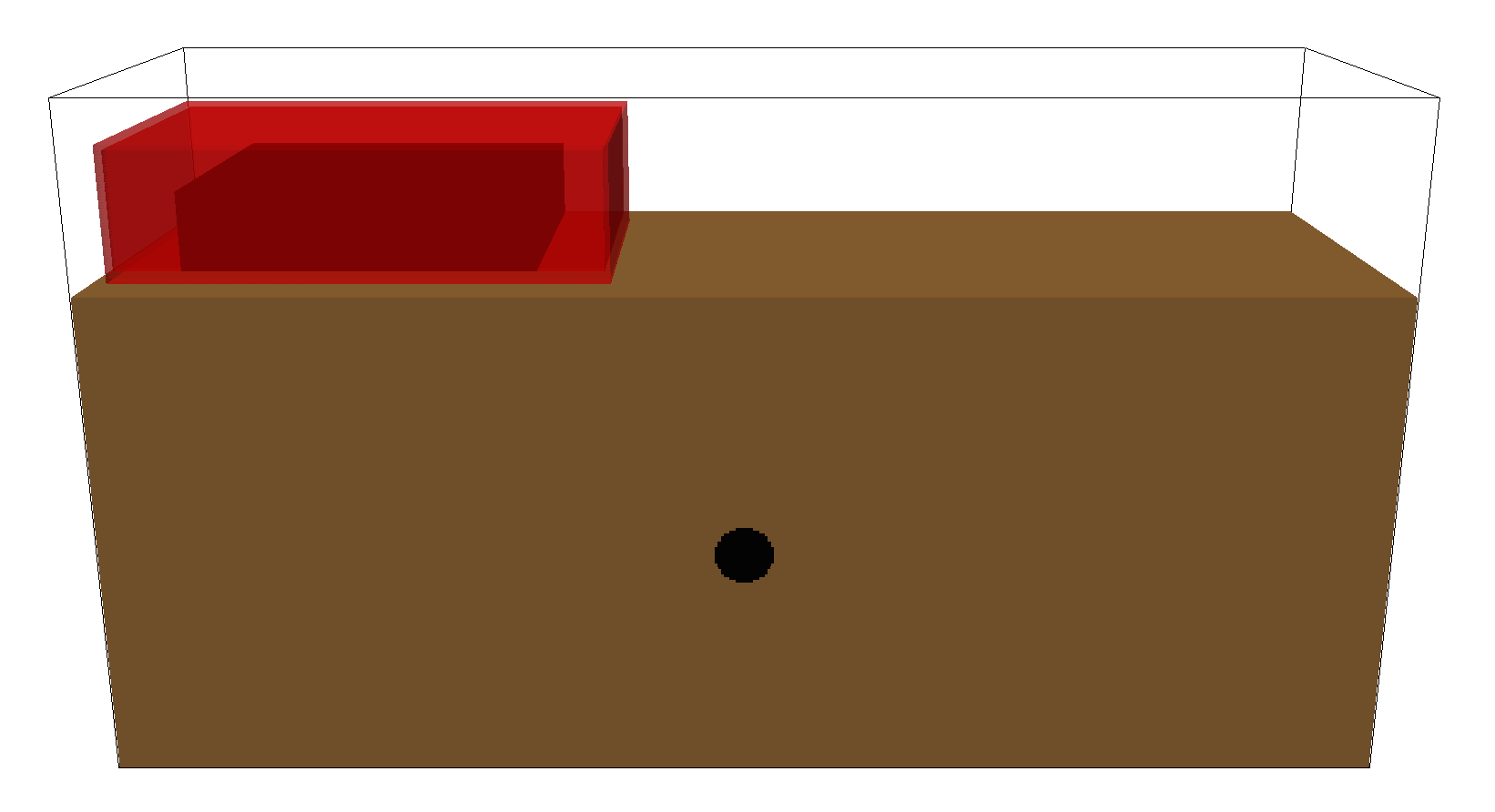
Fig. 48 FDTD geometry mesh showing a metal cylinder buried in a half-space and an antenna model similar to a GSSI 1.5GHz antenna.
The antenna must be moved to a new position for every single A-scan (trace) in the B-scan. This is done using a for loop and creating a new scene (with a new antenna position) for each A-scan. In this example the B-scan distance will be 270mm with a trace every 5mm, so 54 model runs will be required.
gprMax.run(scenes=scenes, n=54, geometry_only=False, outputfile=fn, gpu=None)
Note
If you are moving an antenna model within a simulation, e.g. to generate a B-scan, you should ensure that the step size you choose is a multiple of the spatial resolution of the simulation. Otherwise when the position of antenna is converted to cell coordinates the geometry maybe altered.
Results
After merging the A-scans into a single file you can now view an image of the B-scan using the command (see Model Output section and README.rst for the gprMax/toolboxes/Plotting package):
python -m gprMax.toolboxes.Plotting.plot_Bscan examples/gpr/antennas/gssi_1500/cylinder_Bscan_GSSI_1500_merged.h5 Ey
Fig. 49 shows the B-scan (of the Ey field component). The initial part of the signal (~1-2 ns) represents the direct wave from transmitter to receiver. Then comes a hyperbolic response from the metal cylinder.
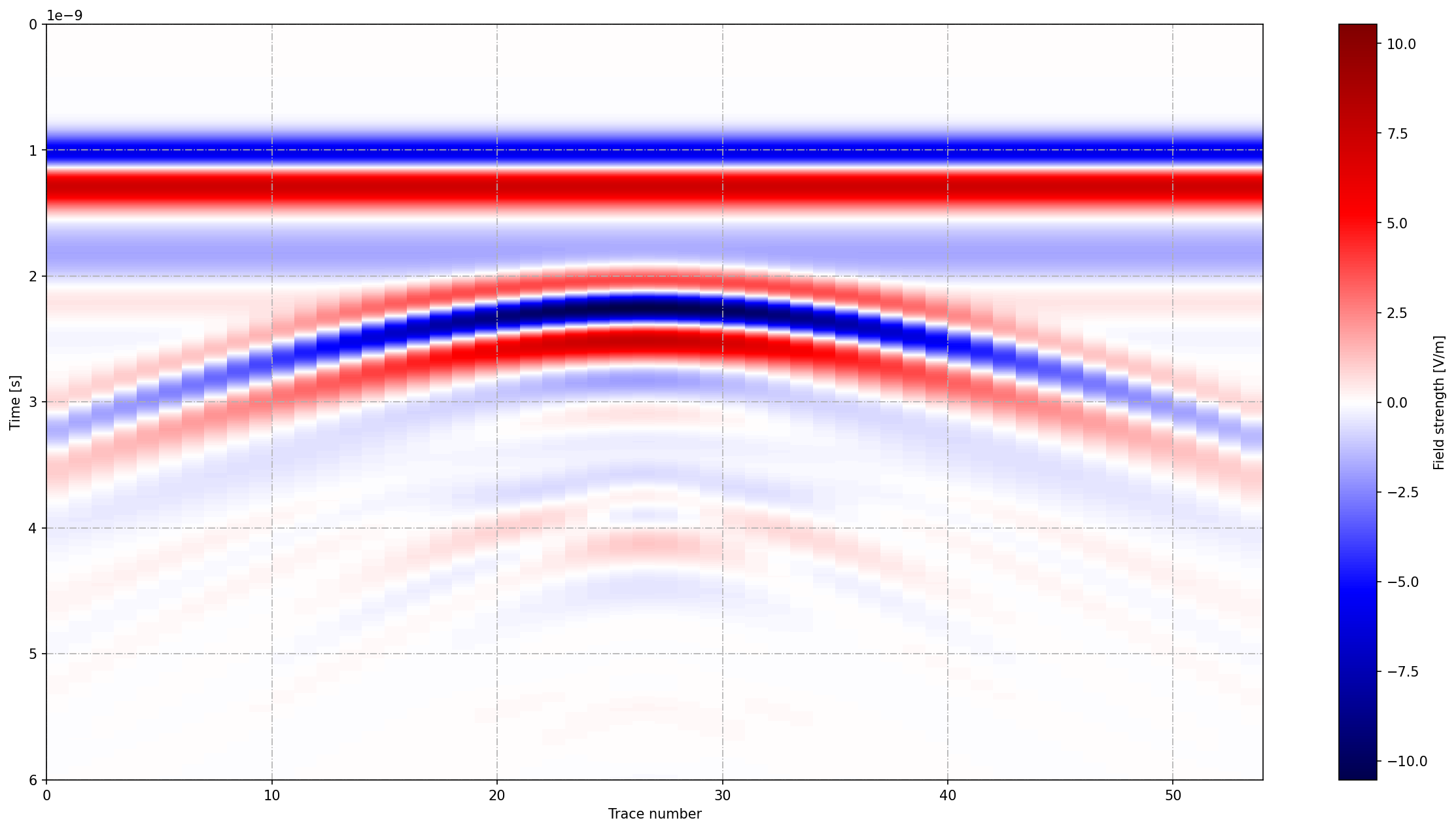
Fig. 49 B-scan of the model of a metal cylinder buried in a dielectric half-space with a model of an antenna similar to a GSSI 1.5GHz antenna.