Benchmarking
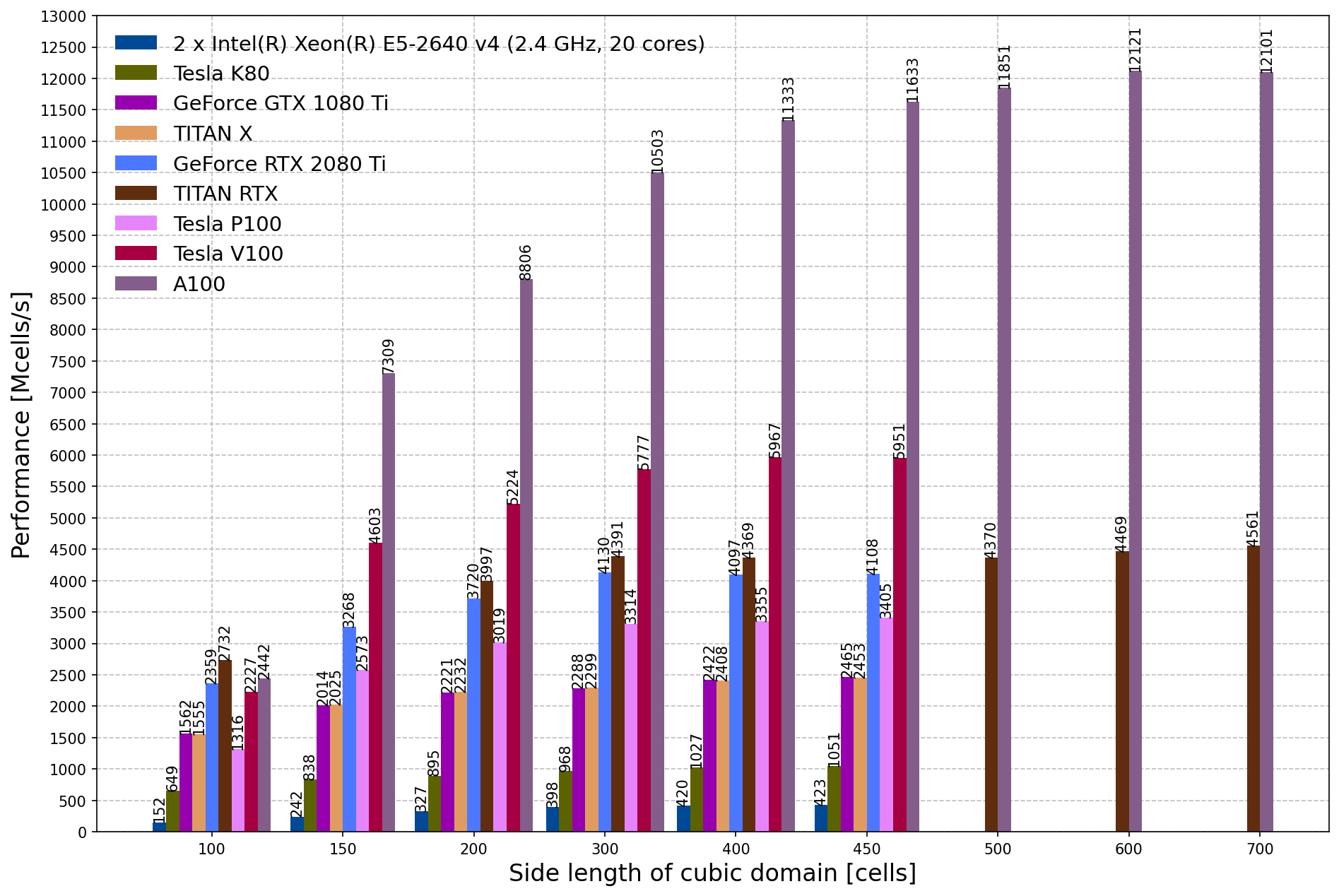
This section provides information and results from performance benchmarking of gprMax.
How to benchmark?
The bench_simple module in the testing/benchmarking sub-package can be
used to benchmark gprMax on your own system. Its default matrix covers domain
sizes from 100^3 to 800^3 cells and several OpenMP thread counts, with a simple
Hertzian dipole source in free space. Run it from the repository root:
(gprMax)$ python -m testing.benchmarking.bench_simple
Domain sizes, thread counts, discretisation, time window, and output path can be selected from the command line. Use a reduced matrix for a quick smoke test:
(gprMax)$ python -m testing.benchmarking.bench_simple --domains 0.024 --threads 1 --time-window 1e-11 --output /tmp/bench_simple
The performance metric used to measure the throughput of the solver is:
where P is the throughput in millions of cells per second; NX, NY, and NZ are the number of cells in domain in the x, y, and z directions; NT is the number of time-steps in the simulation; and T is the runtime of the simulation in seconds.
NTFF benchmarking and validation
The incremental cost of KSIR near-to-far-field collection can be measured with the reusable-surface benchmark. It brackets the monitored cases with unmonitored baseline runs and writes the complete configuration, individual run times, collection backend, slowdown, and overhead to JSON. CPU, CUDA, OpenCL, and Metal use the same benchmark model and configured gprMax precision.
(gprMax)$ python -m testing.benchmarking.benchmark_ntff --backend cpu --threads 8 --precision double
(gprMax)$ python -m testing.benchmarking.benchmark_ntff --backend cuda --device 0 --precision single
The surface sizes, frequency counts, number of repeats, and output filename
can be changed using command-line options; run the module with --help for
the complete list.
End-to-end analytical validation cases are provided separately. They include dielectric and dispersive half-space reflection against Fresnel theory, Hertzian-dipole far- and near-field comparisons, and broadband PEC- and dielectric-sphere backscatter through the Mie resonances. The Debye-sphere case additionally compares averaged and staircased dispersive interfaces. Solver HDF5 files are treated as local cache data; compact reports, CSV tables, and plots record the comparison with the independent analytical solution.
(gprMax)$ python -m testing.validation.validate_plane_wave_dispersive_halfspace --gpu 0
(gprMax)$ python -m testing.validation.validate_plane_wave_realistic_materials --gpu 0
(gprMax)$ python -m testing.validation.validate_hertzian_dipole --gpu 0
(gprMax)$ python -m testing.validation.planar_layered_ntff.validate_point_dipole
(gprMax)$ python -m testing.validation.validate_dielectric_sphere_rcs --gpu 0
(gprMax)$ python -m testing.validation.validate_debye_sphere_averaging --gpu 0
(gprMax)$ python -m testing.validation.validate_pec_sphere_rcs --gpu 0
The OpenMP/Cython angular summation used by the planar-layered transform can also be compared directly with its independent NumPy implementation:
(gprMax)$ python -m testing.benchmarking.benchmark_layered_ntff --threads 8
Omit --gpu to use the CPU. See the validation README for the scope of each case and the
output layout.
Apple Metal GPU Benchmarking
For macOS users with Apple Silicon (M-series) based GPUs, a dedicated Metal benchmarking script is available in the testing/benchmarking sub-package:
This script provides comprehensive benchmarking capabilities specifically designed for the Apple Metal backend:
Features
Automated domain size testing: Tests multiple domain sizes from 50×50×50 to 400×400×400 cells by default
CPU vs Metal comparison: Runs identical simulations on both CPU and Metal backends for direct performance comparison
Performance visualization: Generates plots showing throughput (Mcells/s) and speedup ratios
Data export: Saves the configuration, individual timings, throughput, and speedup results as JSON
Validation integration: Can be combined with PML validation testing
Usage
To run the Metal benchmarking suite:
(gprMax)$ python -m testing.benchmarking.benchmark_metal
For a quick functional test before a full benchmark, reduce the domain, iterations, repeats, and warmups:
(gprMax)$ python -m testing.benchmarking.benchmark_metal --sizes 24 --iterations 4 --repeats 1 --warmups 0 --no-plot --output /tmp/metal_benchmark.json
The script will automatically:
Build identical Python-API scenes for different domain sizes
Run simulations using both CPU and Metal backends
Calculate performance metrics using the standard formula above
Save JSON results and, unless
--no-plotis specified, generate a comparison plot
Visualization Tools
The benchmark_metal.py script includes plotting support for:
Multi-platform comparison: Compare results across different hardware configurations
Custom data visualization: Load and plot benchmark data from various sources
Performance trend analysis: Visualize performance scaling with domain size
Publication-ready plots: Generate high-quality figures for reports and papers
The generated plots compare the performance characteristics of Apple Metal and the CPU solver across the requested domain sizes.